So tell me… what – is – closed loop analog signal processor???
CLASP – The Sound of What’s Been Missing
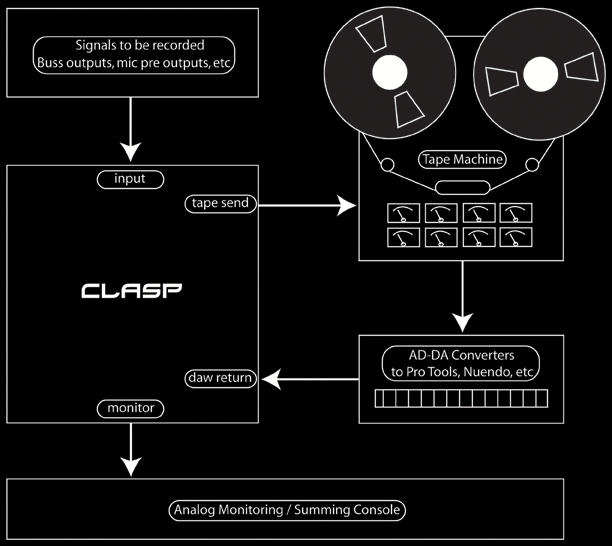
CLASP SIGNAL FLOW
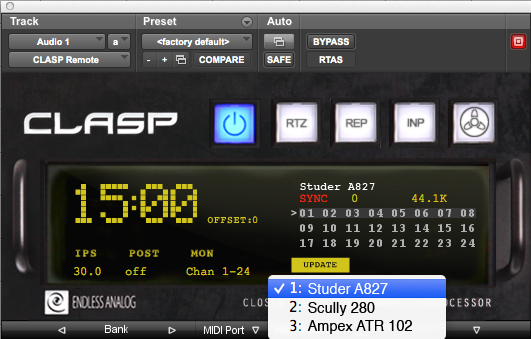
CLASP REMOTE PLUGIN RTAS
CLICK FOR HI-RES COLOR PHOTO
CLICK FOR HI-RES COLOR PHOTO
CLASP READY TAPE MACHINES
FEATURES
Mastering-grade audio signal path
Zero-loss signal path
Sample accurate tape synchronization
Auto input monitor switching
A/D Converter latency correction
Zero latency analog monitoring
Auto tape transport control
Post-roll auto record
Return to zero rewind from DAW
Audible rewind function
Auto rewind
End of tape sensor
Large size tape reel support
CLASP Machine Matrix Ready
MMC and HUI support
Remaining tape time counter
Auto channel cascading
Repro only monitor option
Daisy chaining for up to 72 channels
Auto standby power saving mode
Machine online / offline hotkey
Arm / Disarm all tracks hotkey
Multiple machine sync memory
Direct record mode
MIDI Programmer mode
Manual input monitor select
Wow and Flutter Compensation
“It is not very often that you get to have a look at something technically unique in this business, but I have had the opportunity to do just that recently with a visit to KMR Audio and a demonstration of a unit, designed by one Chris Estes of Endless Analog, called CLASP. ” – Simon Tillbrook, Audio Media Magazine
Hardware
CLASP stands for Closed Loop Analog Signal Processor and, in simple terms, integrates real analogue tape recording into your DAW signal and workflow.
The concept can be quite confusing when looking through the literature and diagrams associated with CLASP, but the system is, in practice, much simpler when demoed, with some very clever stuff going on in the background.
CLASP currently allows your Pro Tools or Nuendo/Cubase DAW (other DAW support is being talked about but not available as yet) to integrate a number of analogue multi-track options from Studer, Otari, Ampex, 3M, MCI, Tascam, Scully, and Sony.
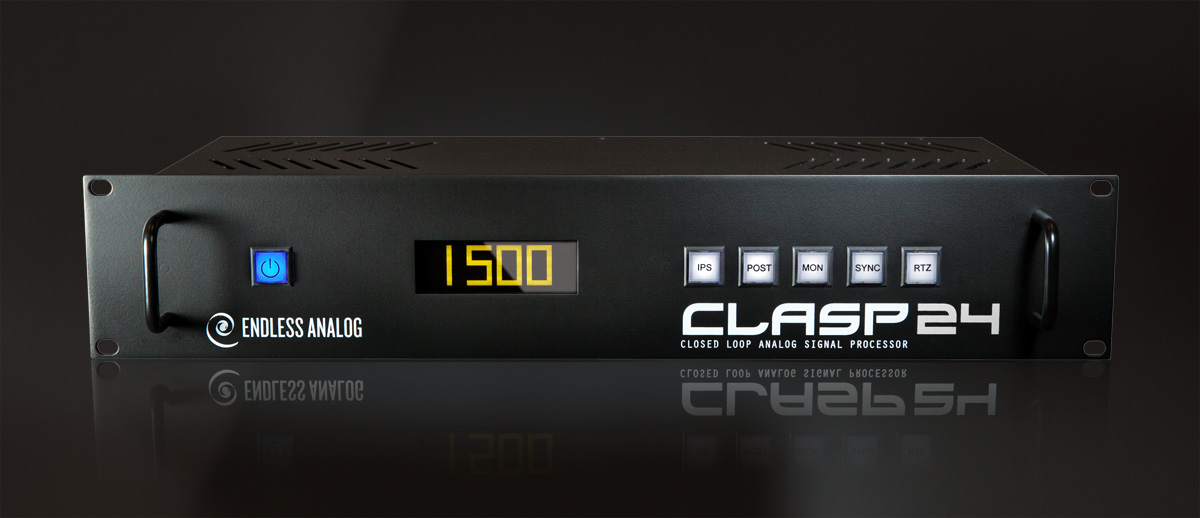
CLASP is packaged in a 2U box with a front panel consisting of a large display (usually set to display tape time remaining) and five large buttons.
These buttons are labelled IPS, MON, SYNC, and RTZ. IPS (inches per second) enables you to select the tape speed for the counter (you need to manually change the speed on your multi-track). POST allows additional post roll after recording. MON is selected for latency-free input monitoring; SYNC is used during the initial setup of CLASP with your DAW (more later) and, finally, RTZ (return to zero). The rear panel of CLASP is a sea of Tascam protocol
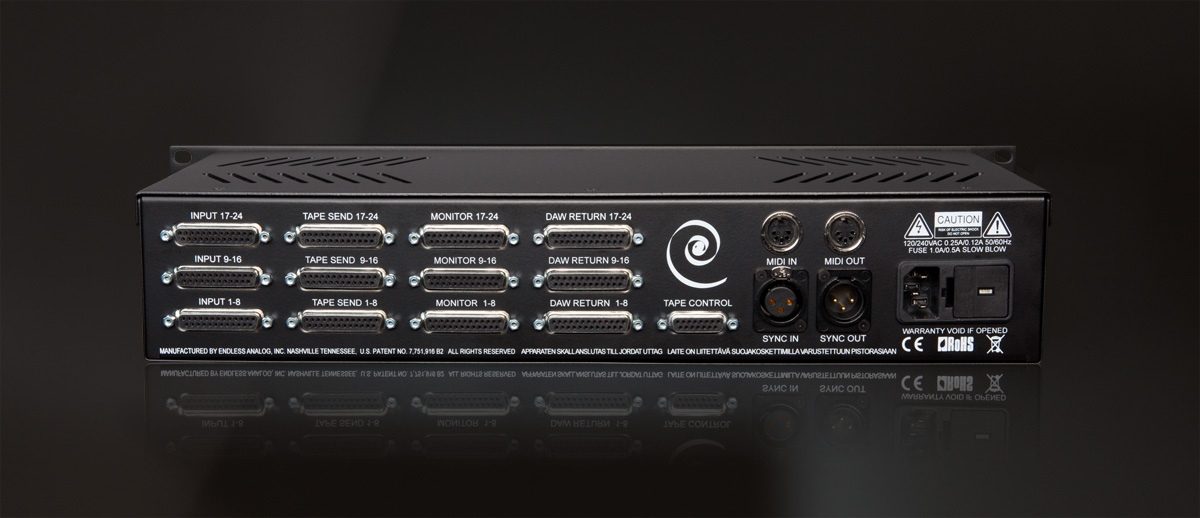
25-pin DSUB connections for use with any multi-track machine. The first three accept input from your console buss outputs or feeds from pre-amplifiers (for example), then the next three deliver the signal to your analogue multi-
track inputs.
The analogue multi-track outputs (that come from your multi-track REPRO head) would then feed your A/D converters into the DAW system, completing the input connection configuration.
Output from your DAW D/A converters then feed back into CLASP through the three DAW return DSUBs, and then finally the Monitor DSUBs get the signal back into your console’s tape returns.
In addition to these audio connections, we have a Tape Control 15-pin connection to connect to your analogue multi-track to control transport, track arming, etc. You can specify which machine you are using and the appropriate cable will be supplied.
XLR connections for sync in and out sit next to MIDI in and out sockets.
It is through MIDI machine control and the HUI protocol that CLASP translates machine control information from your DAW to your analogue multi-track through an appropriate USB to MIDI interface.
It is worth noting that you can chain up to three CLASP units together for control of three analogue machines for 72-Tracks.
Software
We have our CLASP hardware configured; now we need to sort out the software side of things.
I am talking about the set-up with Pro Tools specifically, but remember that Cubase/Nuendo are also catered for.
For the system to work in terms of machine routing
and control, as well as delay compensation (more soon),
we need to have a master fader for each DAW output used
in the session.
Once you have created this, you can hide these and just run your session as normal, they just need to be part of your session set-up to give routing and arming control to each specific analogue track.
Within your Pro Tools session itself you need a single instance of the CLASP Bridge control plug-in to be present. This can be on any track and is used to communicate through MIDI/HUI transport and track arming information to your analogue multi-track.
The CLASP Bridge plug-in is used to store delay compensation and transport control data for up to three tape machines, each with three different speed options. The display in minutes and seconds then behaves according to the selection you have made.
Initial Set-Up & Use
Audio runs through the system input, recorded onto your analogue tape, and then played back via the REPRO head into your DAW where it is recorded. There is obviously a delay between heads on your multi-track, and this is the really clever bit with CLASP.
CLASP needs to learn the specifics of your multi-track machine from a control, speed, and head delay standpoint, so you run a sync setup for each tape speed for your system to learn.
This is a simple button push affair, and CLASP informs you when the process is complete and successful. From then on you simply run your session as normal.
When you record the audio from your analogue machine, it is recorded into your DAW in real time and, with input monitoring alongside your DAW output, you enjoy zero latency.
When you push ‘stop’ at the end of your recording, CLASP time stamps and realigns your audio into the future on your timeline based on the delay compensation calculated during the initial set-up…very clever.
You can select between different speeds from one take to the next, taking advantage of the different characteristics of your machine, tape, and speed at the push of a couple of buttons and, because you are storing your audio directly into your DAW system, one reel of tape can be constantly reused across multiple sessions until you deem it to be no longer of optimum use to you.
Summing Up
The CLASP system works. It does exactly what it claims to do, and there is nothing else to compare it to. It is a system that is almost impossible to get your head around in theory but, when seen in use, it becomes surprising simple in operation.
The initial set-up with CLASP in terms of
session layout and synchronisation is the tricky
part but, done once, you are good to go.
Studios with tape machines that have become idle will love the opportunities CLASP offers, bringing them back into service and offering clients an even greater sound pallet to incorporate into their projects.
For those who have had the experience, CLASP lets you rediscover all that you loved about tape and its interaction with sound but which, maybe, had just slipped from your memory.